Connecting Your First Computer
Before you begin, start Launcher Server and Windows Agent. For the first connection, use a player station and server on the club’s trusted local network.
Check the connection on the gaming PC
Section titled “Check the connection on the gaming PC”- Open Agent Settings. On General, note the Display name or Agent ID so you can identify the PC in Launcher Admin.
- Give Agent time to connect. Under Connection, check Status and Launcher connections. For a direct connection, look for Connected and check the server address. With discovery, find the intended Launcher Server and check that it shows Connected, even if the overall status is Partially connected.
In configured mode it connects to one configured address. In auto mode it looks for reachable servers with discovery enabled. The installation administrator sets the mode and address. General shows the result.
Add the PC to My Agents
Section titled “Add the PC to My Agents”- Open Agents in Launcher Admin for the intended Launcher Server.
- Find the PC by name or Agent ID in Available Agents and select Add to My Agents. If it is already in My Agents, check its card there.
- Wait for the list to refresh. The PC should appear in My Agents as Online.
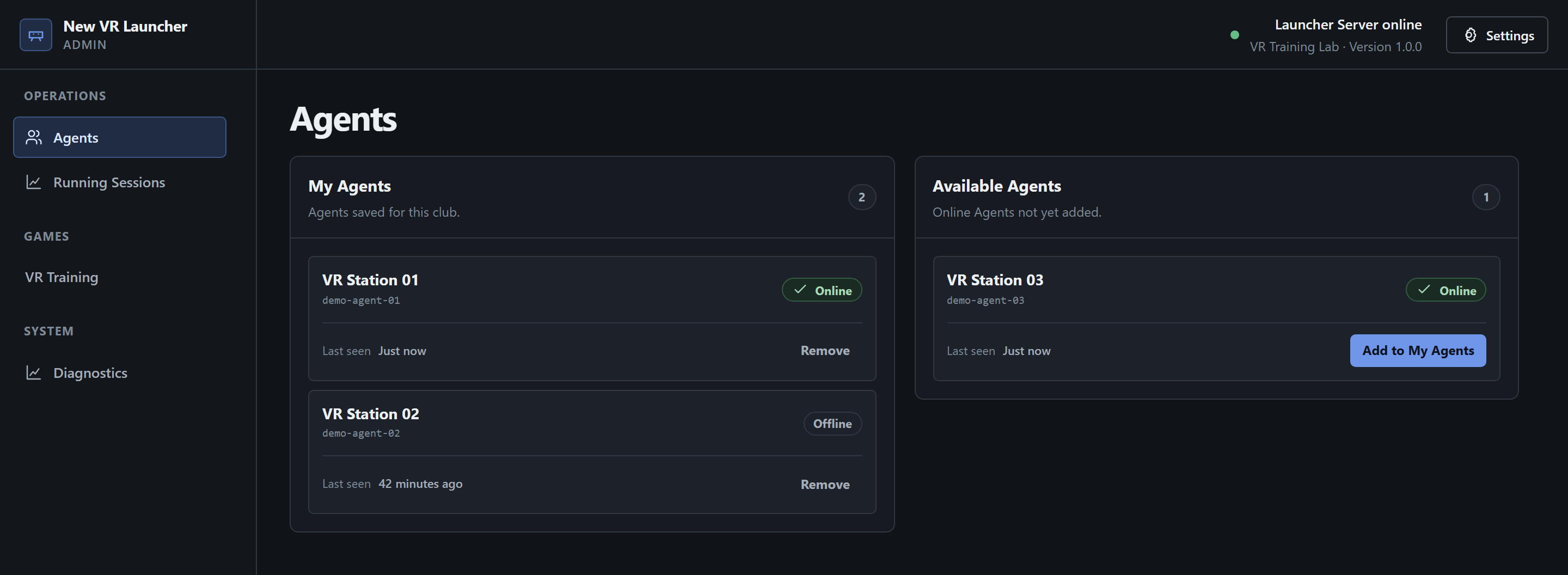
The network connection lets the server see Agent. Adding the PC saves it in that Launcher Server’s list. Check readiness for a specific game on the game’s page.
If the PC does not appear
Section titled “If the PC does not appear”- Check the address of the Launcher Admin tab. On the gaming PC, open General and check Status, Launcher connections, and Details if shown.
- Offline means a saved PC has no current connection to this server. Connection unavailable means Launcher Admin has yet to receive the connection data. In that case, wait for the list to refresh or select Retry if offered.
- If the intended server is missing or Agent keeps reconnecting, ask your administrator to check the connection mode, address, and server reachability using the networking guide.
See Managing My Agents for more about the cards and lists. Once your PCs are connected, continue to Starting Your First Game Session.